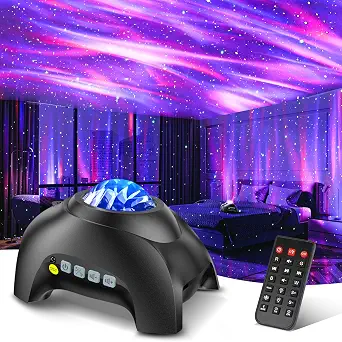
Northern Galaxy Light Aurora Projector
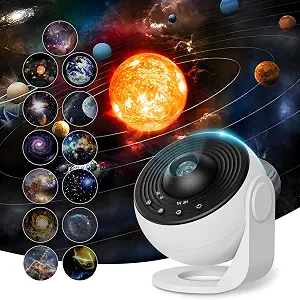
Galaxy Projector Pro for Bedroom
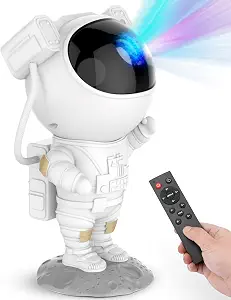
Star Projector Galaxy Night Light – Astronaut Space Projector
Best Star Projector Buying Guide — Black Friday Deals 2026
A star projector can be a shifting wash of color, a disc-selected galaxy scene, or a small astronaut-shaped lamp aimed around the room. The right choice depends on what you want to see, how you expect to position the device, and whether sound or timed shutoff matters. This guide compares three distinct configurations using their listed features, so you can rule out mismatches before looking at a Black Friday offer. Treat any promotion as something to verify on the exact product page: confirm the model and package details rather than assuming a headline describes the version you intend to buy.
Northern Galaxy Light Aurora Projector
Best Overall is an editorial fit for shoppers who want more than a ceiling effect from a single device. The Northern Galaxy Light Aurora Projector combines four colors (red/green/blue/white) with 33 lighting atmospheres, 3 modes, and 16 northern light effects. Those choices make it a natural shortlist candidate when variety of lighting effects is a priority, rather than a fixed disc selection or an astronaut-shaped design. The numbers describe listed options, not a promise that every setup or mood will look the same in every room.
There are also sound features to consider. The projector lists 8 natural white noises and a built-in Bluetooth speaker, making it worth comparing for a bedtime or wind-down routine where both projected light and audio are relevant. Think about whether you would actually use the listed sound options; if the main goal is a visual scene alone, those details may be less important than color and effect controls. The unit uses an LED light source and is corded electric, so include a suitable outlet location in your placement decision rather than treating power as an afterthought.
Its stated dimensions are 6.7"L x 5"W x 4.3"H. Use that exact footprint when considering a shelf or bedside surface, and check the intended projection direction before deciding where it belongs. No projection distance or coverage area is provided here, so do not assume a particular reach from the effect count. Before a Black Friday purchase, verify that the listing is for this corded model and confirm the features shown on the offer page. The Best Overall label reflects its broad combination of lighting choices and sound features among these three options; it is an editorial recommendation, not a claim of tested superiority.
Key specs
| Power | Corded Electric |
| Light source | LED |
| Colors | four colors (red/green/blue/white) |
| Lighting effects | 33 lighting atmospheres, 3 modes, and 16 northern light effects |
| White noise | 8 natural white noises |
| Speaker | built-in Bluetooth speaker |
| Dimensions | 6.7"L x 5"W x 4.3"H |
Galaxy Projector Pro for Bedroom
Check Price on Amazon
Best for Disc-Based Galaxy Scenes points to a different kind of choice: the Galaxy Projector Pro for Bedroom comes with 13 different HD galaxy discs. Consider this format if selecting among disc scenes is more appealing to you than relying on a range of color atmospheres or an astronaut form. The projector offers 360° rotation, giving shoppers another listed feature to weigh when considering how the scene is presented. The description identifies the discs as galaxy discs; it does not provide a scene-by-scene breakdown here, so check the actual offer details if the specific disc contents matter to your decision.
Placement has more numerical guidance for this model than for the other options. Its stated projection distance is 1.5 to 16 feet, with an optimal projection distance of 9.84 feet, and its coverage area is 135 to 754 square feet. Treat these figures as the product’s listed planning references, not a guarantee that a particular room will look a certain way. Compare them with the distance and surface available in your own setup, and look for the same figures on the exact listing before checkout. The ceiling projector is USB-powered, so confirm that the power arrangement suits the position you have in mind.
The automatic shutoff options are 1 hour or 2 hours. Those settings can help determine whether this configuration matches the length of a typical viewing session. The product is made of Acrylonitrile Butadiene Styrene (ABS), another listed specification to confirm if material is part of your comparison. On Black Friday, verify that the offer is for the disc-based model and includes the 13 different HD galaxy discs described. The recommendation label is a guide to its format, not a measured performance claim; choose it when disc selection, rotation, stated room figures, and USB power align with your priorities.
Key specs
| Projection discs | 13 different HD galaxy discs |
| Rotation | 360° rotation |
| Projection distance | projection distance of 1.5 to 16 feet (the optimal projection distance is 9.84 feet) |
| Coverage area | covers an area of 135 to 754 square feet. |
| Power | The ceiling projector is USB-powered. |
| Timer | automatically turn off after 1 hour or 2 hours. |
| Material | Acrylonitrile Butadiene Styrene (ABS) |
Star Projector Galaxy Night Light – Astronaut Space Projector
Check Price on Amazon
Best Budget is the editorial label for this astronaut-style option, a useful distinction for shoppers drawn to its recognizable form and straightforward set of stated details. The Star Projector Galaxy Night Light – Astronaut Space Projector uses an LED light source and is listed as corded electric. Its wattage is 5 watts. Instead of a separate projection-angle specification, the listing explains that the astronaut's head is magnetically connected to the body for easy adjustment of the nebula projection angle. That detail gives you a practical placement question: where will you set the body, and which direction do you want to aim the projection?
A timer can be set for 45 or 90 minutes. Those shutoff choices may suit someone who wants a defined end to a bedtime session, while a shopper who wants a different routine should decide whether these specific intervals fit. Do not assume another timer setting from the product name or appearance. The included-items details matter at checkout, too: the package lists USB Cable *1, NO Adapter, and Remote Control (without battery) *1. Check those notes against what you already have and the setup you plan to use; the provided facts do not specify an adapter or remote battery as included.
For Black Friday, compare the exact listing and package configuration rather than judging the offer by the astronaut styling alone. Confirm the timer and included-item details on the page you are considering, and make sure the adjustable projection angle is relevant to your intended spot. The Best Budget label helps identify this guide’s budget-oriented pick, but it does not establish a sale price or guarantee that it will cost less than the other products. Choose it when the form, angle adjustment, and stated timer choices fit your priorities; look elsewhere if your main draw is a broad catalog of lighting effects or disc-based scenes.
Key specs
| Light source | LED |
| Power | Corded Electric |
| Wattage | 5 watts |
| Timer | 45 or 90 minutes |
| Projection angle | the astronaut's head is magnetically connected to the body for easy adjustment of the nebula projection angle |
| Included cable | USB Cable *1 |
| Adapter | NO Adapter |
| Remote battery | Remote Control (without battery) *1 |
Choose the visual format before chasing feature counts
Start by picturing what you want the room to show. The Aurora model emphasizes colored lighting atmospheres and northern light effects. The disc-based projector is organized around its 13 different HD galaxy discs, while the astronaut projector pairs its character form with an adjustable nebula projection angle. These are different ways to approach a star projector, so a long feature list is not automatically the best fit if you already know which style you prefer.
Next, decide how much variety you expect to use. The Aurora’s listed four colors, 33 lighting atmospheres, 3 modes, and 16 northern light effects may be relevant when changing the lighting presentation is a central priority. A disc format may be a better match if choosing among physical scene options sounds more appealing. If the astronaut shape and its magnetically connected, adjustable head are the draw, that interaction may settle the choice without comparing every lighting detail.
During Black Friday browsing, check that the listing’s product name and stated format match your shortlist. Do not infer specific scenes from a product title, or assume the models offer interchangeable projection styles. If you are undecided, write down the one visual feature you most want and use it to eliminate options that do not describe that approach. Then compare the remaining specifications that affect your actual use.
Check the planned spot against the listed reach
Room fit is not just a question of whether a projector can sit on a surface. Think about the direction of the projection, the surface you want it to reach, and the distance between the device and that surface. The disc-based Galaxy Projector Pro is the only one here with stated projection distance and coverage area figures: 1.5 to 16 feet, an optimal projection distance of 9.84 feet, and coverage of 135 to 754 square feet. Use those details as a starting point for checking your layout, not as a promise about the result in your particular room.
The astronaut projector makes angle adjustment part of its design: its head is magnetically connected to the body for easy adjustment of the nebula projection angle. Consider whether that style of aiming suits the location you have in mind. The Aurora model lists its dimensions as 6.7"L x 5"W x 4.3"H, which can help you assess the surface it will occupy. Since no reach figures are supplied for these two models here, avoid treating their descriptions as evidence of a particular coverage area.
For a Black Friday comparison, match any room-related claims on the offer page to the exact model. If the distance or coverage figures are important to you, verify that those figures appear for the product you are considering. Make the decision around your actual placement, not a room-size assumption based on the word “bedroom” in a title.
Make power and package notes part of the shortlist
Power details can rule out an otherwise appealing choice when the intended position does not suit the listed arrangement. The Aurora and astronaut projector are described as corded electric. The disc-based ceiling projector is USB-powered. Decide where you expect to place the device, then compare that plan with the power description on the product page. The supplied facts do not establish additional cable lengths, adapter compatibility, or other setup details, so verify anything beyond the stated power type before relying on it.
The astronaut model has the most explicit package notes among these choices: USB Cable *1, NO Adapter, and Remote Control (without battery) *1. Keep those details in view when comparing the actual offer and considering what you may need for your setup. Do not assume an adapter or remote battery is included just because a listing image shows the product in use. For the other projectors, use only the package information shown on their exact pages rather than borrowing assumptions from this model.
Black Friday listings can make it tempting to compare only a headline or product image. Instead, confirm the precise product and read its listed power and included-item details before deciding. If an item’s power arrangement or package contents are essential to your plan, resolve that question on the offer page rather than treating an unclear detail as settled.
Match timers and sound to how you will use it
A timer is useful only if its listed shutoff choices line up with your routine. The astronaut projector offers 45 or 90 minutes, while the disc-based projector automatically turns off after 1 hour or 2 hours. Compare those stated options with the length of the session you have in mind. The Aurora facts provided here do not specify a timer, so do not assume that it includes one or treat the missing detail as proof that it does not. Check its product page if timed shutoff is a deciding requirement.
Sound is another point of separation. The Aurora lists 8 natural white noises and a built-in Bluetooth speaker. If audio is part of the atmosphere you want, those are relevant features to compare directly. If you plan to use a projector for light alone, consider whether sound changes your shortlist at all. The provided details for the other two products do not specify comparable sound features, so avoid assuming they have or lack them based only on this information.
When reviewing a Black Friday offer, verify the timer wording and sound features against the exact model page. Focus on the controls you expect to use regularly rather than treating every listed option as equally important. That keeps the comparison tied to your evening routine instead of turning it into a count of unrelated features.
Read the exact Black Friday offer before deciding
Once you have narrowed the choices by scene style, room placement, power, and routine, inspect the actual offer carefully. Confirm the product name and the configuration you mean to buy, then compare the details that drove your decision. For the disc-based projector, that might be the 13 different HD galaxy discs and the stated distance and coverage figures. For the astronaut option, it might be the adjustable head, timer choices, and package notes. For the Aurora model, it might be the colors, effects, and sound features.
Do not treat a Black Friday label as proof that a particular configuration is discounted, available, or the same as another listing. The information in this guide does not establish current prices or promotions. Check the displayed offer for the exact item and review any variant or package description shown there. If a feature you care about is not clear, seek confirmation from the product page before making the purchase rather than filling the gap with an assumption.
A useful final check is to restate your top priorities in plain language: what the projection should look like, where the unit will sit, which power arrangement works, and whether shutoff or sound matters. Choose the option whose listed details answer those needs most directly. This is a more dependable way to assess a Black Friday offer than deciding from the headline alone.
Make your Black Friday choice
The shortlist comes down to the experience and setup you want: varied lighting atmospheres and sound features, an astronaut-shaped projector with an adjustable angle, or a disc-based galaxy format with stated distance and coverage figures. Before a Black Friday purchase, match those priorities to the exact product page, confirm its power and package details, and check any offer information directly. The recommendation labels in this guide are editorial signposts, not test results or promises about price. Pick the configuration that fits your room and routine, and verify the details that matter before checkout.