TCL S55H 2.1 Sound Bar with Wireless Subwoofer for Smart TV
Best Soundbars Buying Guide — Black Friday Deals 2026
Will your next soundbar connect cleanly to your television, and does its equipment layout suit the way you want to listen? Those questions are a better starting point than a Black Friday headline. The three options here take different approaches: the Bose TV Speaker offers several wired input choices and dialogue and bass modes; the Amazon Fire TV Soundbar keeps the arrangement to a two-speaker bar; and the TCL S55H pairs its bar with a wireless subwoofer. Black Friday offers can change, so treat the seasonal label as a prompt to check the exact model and package rather than as proof of a discount. First decide what your TV can connect to and whether you want a separate subwoofer. Then weigh the available formats, controls, and physical setup against your room and listening habits.
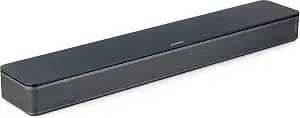
Bose TV Speaker
The Bose TV Speaker is the Best Overall pick among these three for a shopper who wants a straightforward bar with several ways to connect equipment and a couple of listening adjustments on its remote. That label reflects this guide’s fit-based editorial choice, not a measured comparison or a claim that it will suit every room. Its two angled full-range drivers are the listed speaker arrangement, while the remote’s dialogue mode is intended to further enhance speech. The remote can also add a bass boost for more depth, giving you two specific adjustments to consider when deciding whether the controls match your everyday preferences.
For a TV connection, the Bose can use an included optical audio cable or an HDMI cable sold separately. Its listed inputs are HDMI ARC, optical, and AUX, and the speaker can connect up to three devices through those inputs. Bluetooth version 4.2 is also listed, as is a USB connection for service only. Before a Black Friday purchase, compare the ports on your TV and any other devices you expect to connect with the inputs described on the exact listing. In particular, don’t assume that an HDMI cable is included: the provided setup information says it is sold separately. That small package detail can affect what you need to arrange for setup.
This option also gives you a clear path to a compatible Bose bass module if you decide that you want one: it works with the Bose Bass Module 500 or 700. The required connection cable or a standard 3.5 millimeter audio cable is sold separately, so treat the module and cable as separate parts of the plan rather than assuming they are included. If you prefer to begin with the speaker itself, the listed optical and HDMI ARC setup options help you assess the TV connection first. During Black Friday, keep the model, included items, and any additional components distinct when comparing offers; the seasonal label does not tell you what a particular package contains.
Choose the Bose if its mix of inputs and remote adjustments is more useful to you than making a wireless-subwoofer arrangement the central feature of your setup. Its listed size can help you check the available space before ordering, but measure your own intended location rather than assuming it will fit beneath or beside a particular television. Check whether you plan to use optical or HDMI, whether you already have the cable required for your preferred connection, and whether a future bass module is part of your budget and space plan. Those practical checks make this Best Overall label a starting point for choosing, not a substitute for confirming your exact Black Friday listing.
Key specs
| Dimensions | 2.21" H x 23.38" W x 4.02" D |
| Drivers | 2 angled full-range drivers |
| Connectivity | Bluetooth version: 4.2 / HDMI ARC (Audio Return Channel) / Optical in / AUX in / USB (for service only) |
| Device connections | Connect up to 3 devices through the inputs (HDMI, Optical in, and AUX in) |
| TV setup | via an optical audio cable (included) or an HDMI cable (sold separately) |
| Remote control | enables a dialogue mode to further enhance speech or add a bass boost for more depth |
| Bass module compatibility | compatible with the Bose Bass Module 500 or 700 and requires the Bose Bass Module Connection Cable or a standard 3.5 millimeter audio cable, sold separately. |
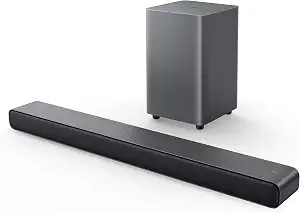
TCL S55H 2.1 Sound Bar with Wireless Subwoofer for Smart TV
Check Price on Amazon
The TCL S55H is the Best for a wireless-subwoofer setup choice because its listed configuration pairs the soundbar with a subwoofer that connects wirelessly. That makes the arrangement a natural candidate if you specifically want a separate subwoofer in the equipment plan. It is a configuration-based recommendation, not a promise about how the system will sound in your room. The listed maximum output is 220 watts, and the audio formats include Dolby Atmos, DTS Virtual:X, and Surround Sound. Consider those details alongside the equipment arrangement: formats may matter to your source material and preferences, while the subwoofer connection is a concrete part of the physical setup to plan.
The bar lists auxiliary, Bluetooth, HDMI, optical, and USB connections. That range gives you several connection types to compare against your television and other devices, but the provided facts do not identify a preferred connection for every TV. Check your own ports and the exact listing before deciding which cable or input you will use. The TCL also lists AI Sonic Auto Room Calibration. If room calibration is a feature you want to consider, include it in your comparison, while keeping the decision grounded in the stated feature rather than assuming a particular outcome in your space.
A separate wireless subwoofer changes the placement question: you need to consider where both pieces will go, not just whether the bar fits near the TV. The bar’s listed dimensions can help with the first part of that check, and your room layout will determine whether you have a suitable place for the companion component. Wireless describes the subwoofer connection; it does not remove the need to plan where the subwoofer will sit or establish what else is included in a particular package. Before a Black Friday purchase, read the listing for the exact model and package and make sure the configuration matches the item you intend to buy.
The TCL may suit shoppers who have already decided that a separate subwoofer belongs in their setup and who want to compare the listed formats and connections as well. It may be less compelling for someone whose first priority is a simple bar-only arrangement, but that is a matter of matching equipment to preference, not a claim about sound quality. Compare its connection options with the ports you can actually use, consider how the subwoofer fits the room, and review the product listing for package details. On Black Friday, make those checks before weighing an offer’s headline so the wireless-subwoofer configuration you selected is the one in the cart.
Key specs
| Audio formats | Dolby Atmos, DTS Virtual:X, Surround Sound |
| Maximum output | 220 watts |
| Room calibration | AI Sonic Auto Room Calibration |
| Connections | Auxiliary, Bluetooth, HDMI, Optical, USB |
| Soundbar dimensions | 3.86"D x 31.89"W x 2.36"H |
| Subwoofer connection | Wireless |
Amazon Fire TV Soundbar
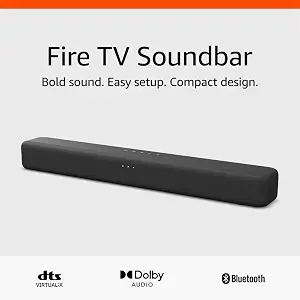
The Amazon Fire TV Soundbar is the Best Budget recommendation in this guide for shoppers considering a compact two-speaker-bar arrangement with a TV connection through HDMI eARC/ARC. “Best Budget” is an editorial fit label among the listed products, not a statement about its price, value against other market options, or current Black Friday promotion. The listed audio format information describes it as a 2.0 speaker with DTS Virtual:X and Dolby Audio. Bluetooth lets you connect a phone or tablet, while the TV connection is through the HDMI eARC/ARC port on the television. Check that port on your own set before choosing this model.
The bar’s listed dimensions provide a useful reference when checking the space near your screen. Its stated length and height may help you compare it with the intended location, but your TV stand, screen, and surrounding equipment determine whether that space is actually available. The listing says the soundbar works with smart TVs and with TVs connected to streaming media players. That gives shoppers a stated compatibility detail to consider without requiring assumptions about a particular TV brand or setup. For Black Friday, confirm the exact model and the listing’s included items rather than inferring package contents from the product name.
This model’s appeal is its clearly described connection path and bar-only speaker configuration. If you want Bluetooth access for a phone or tablet as well as the specified TV connection, those are relevant features to compare with your routine. If you are deciding among these three products, ask whether you want the Bose’s listed input variety and remote dialogue or bass options, the TCL’s separate wireless subwoofer, or this Amazon bar’s 2.0 arrangement. Those are differences in stated configuration and features; they do not establish which will sound best in an individual room.
Treat the Best Budget label as a prompt to examine the offer carefully, not as a prediction of a sale price. On Black Friday, compare the exact listing for model identity, package contents, and the connection you need. The facts provided here do not establish a price, discount, or stock status, so check the current offer directly before deciding. Also confirm that the HDMI eARC/ARC port is available for the intended TV connection and that the bar’s footprint works with your setup. If those details line up with your needs, the Amazon Fire TV Soundbar is a focused option to consider without adding a separate subwoofer to the listed arrangement.
Key specs
| Audio formats | 2.0 speaker with DTS Virtual:X and Dolby Audio |
| Bluetooth | Connect your phone or tablet via Bluetooth |
| TV connection | the HDMI eARC/ARC port on your TV |
| Dimensions | a length of 24“ and a height of just 2.5" |
| TV compatibility | Fire TV Soundbar works with smart TVs, and TVs connected to streaming media players. |
Let your TV’s available connection narrow the field
Start with the television you intend to use, not with a feature list. The Amazon Fire TV Soundbar connects to the HDMI eARC/ARC port on the TV, so check whether that connection is available and suitable for your setup. The Bose TV Speaker lists HDMI ARC and optical, and its setup information specifies an included optical audio cable or an HDMI cable sold separately. The TCL lists HDMI and optical along with auxiliary, Bluetooth, and USB connections. These distinctions make the TV’s actual ports a practical first filter, but they do not establish that every input will serve every device in the same way.
Write down the connection you plan to use before opening Black Friday listings. If you choose the Bose and prefer HDMI, factor in that its HDMI cable is sold separately; if you choose optical, note that the optical cable is included. For the Fire TV Soundbar, check for the specified HDMI eARC/ARC connection on the TV. For the TCL, compare the ports listed for the bar with the connection options you have available. Then check the exact listing for package contents and any cable details rather than assuming that a port name means a cable comes in the box. This quick port-and-package review can prevent an appealing seasonal offer from becoming a mismatched purchase.
Decide whether a separate subwoofer fits your room
The TCL S55H is the only one of these listed configurations that expressly pairs the bar with a wireless subwoofer. That may be the most relevant distinction if you have already decided to include a separate component. It also means your space check should account for the subwoofer’s location as well as the bar’s position near the TV. “Wireless” describes its connection, but it does not tell you where it can go in your room or what the package contains, so check the listing and plan the placement you can accommodate.
The Bose TV Speaker is compatible with the Bose Bass Module 500 or 700, but the connection cable is sold separately, with a standard 3.5 millimeter audio cable also identified as an option. That compatibility is useful to know if you might add a module later, but do not assume a module or cable is part of a Black Friday bundle unless the exact offer says so. The Amazon Fire TV Soundbar is described as a 2.0 speaker; consider whether that listed arrangement fits your preference. Compare the full equipment plan, not just the main bar, and avoid choosing a configuration simply because its headline emphasizes an added component.
Match listed listening features to your own priorities
Features are most useful when they answer a real preference. If you want a remote control option specifically for dialogue, the Bose lists a dialogue mode intended to further enhance speech. Its remote also enables a bass boost for more depth. Those are particular controls to weigh if you expect to adjust listening modes, but the facts do not establish how often you will use them or how they will perform in your room. Think about whether either adjustment would matter in your normal viewing rather than treating more options as automatically better.
The TCL lists Dolby Atmos, DTS Virtual:X, and Surround Sound, along with AI Sonic Auto Room Calibration. The Amazon Fire TV Soundbar lists DTS Virtual:X and Dolby Audio. Use those statements to compare the formats and features that matter to you, while avoiding assumptions about results with content or equipment not described in the product information. A Black Friday listing may give additional package or compatibility details; verify those on the exact model page. Make a short list of must-haves and nice-to-haves, then use the provided feature descriptions to see which candidate aligns. This keeps the choice personal and specific without turning feature names into unsupported promises.
Use placement and equipment details as part of the decision
A bar needs a place near the TV, and a setup with a separate subwoofer needs a place for that component too. Compare each product’s listed dimensions with the actual shelf, stand, or other location you intend to use. Measure the available space yourself, including any nearby equipment that could affect placement. The supplied dimensions describe the products, not your furniture or room, so a simple measurement is more useful than assuming that a bar will fit because it looks compact in a listing photo.
Also consider how many connection points your routine calls for. The Bose says it can connect up to three devices through its HDMI, optical, and AUX inputs, and it lists Bluetooth version 4.2 as well as USB for service only. The TCL lists auxiliary, Bluetooth, HDMI, optical, and USB. The Amazon bar lists Bluetooth for a phone or tablet and the specified TV connection through HDMI eARC/ARC. These facts can help you make a practical connection map. During Black Friday, compare the exact model and included components against that map, especially if you expect to connect more than the television.
Make the Black Friday comparison about the exact item
A seasonal label is not enough information to decide whether an offer fits. Confirm the complete model name and product identity first, then inspect what the listing says is included. This matters for the Bose because its setup details distinguish an included optical cable from an HDMI cable sold separately, and its compatible bass modules and connection cable are separately described. For the TCL, verify that the item is the bar-and-wireless-subwoofer configuration you intended to consider. For the Amazon Fire TV Soundbar, confirm the model and package rather than assuming the listing contains an accessory that is not specified here.
Compare the offer against your written requirements: TV port, preferred connection, desired equipment arrangement, available space, and any listening feature you have prioritized. Check the current offer itself for its price and package information; no price or active promotion is established in this guide. If two options still seem plausible, choose the one whose stated setup matches your actual plans with fewer unresolved questions. A careful Black Friday comparison is not about chasing the biggest headline. It is about verifying that the particular item offered is the model and arrangement you meant to buy.
Make your Black Friday choice
Before checkout, make one final pass through the exact listing: confirm the model, TV connection, package contents, and available placement. Decide whether you want a bar-only arrangement, the Bose’s listed remote modes and input choices, or the TCL’s wireless-subwoofer configuration. Check any separately sold cable or compatible component you intend to use, and verify the current Black Friday offer directly rather than assuming a discount or bundle. Once those details match your needs, choose by configuration and daily usefulness—not by the seasonal label alone.