Amazon Kindle Paperwhite 16GB (2024 model) – Black
Best Ereader Buying Guide — Black Friday Deals 2026
An e-reader shortlist is most useful when it rules out the wrong kind of reading experience, not when it simply collects feature lists. These three options span a larger Paperwhite display, compact black-and-white reading, and a color E Ink screen. Consider what you read, where you tend to read, and whether listening or file formats matter to your routine. The Best Overall, Best Budget, and Best for Color E Ink labels are editorial choices among these picks, not measured awards or promises about price. Black Friday can make comparison especially tempting, but a promotion is relevant only if it applies to the precise model and configuration you want. Start with your reading priorities, then check the offer details.
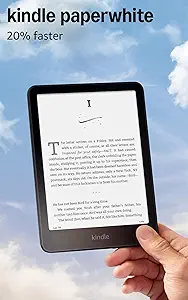
Amazon Kindle Paperwhite 16GB (2024 model) – Black
Check Price on Amazon
The Best Overall label goes to the Paperwhite for a combination of a 7-inch Paperwhite display, adjustable screen tone, and a stated battery life of up to 12 weeks on a single USB-C charge. That mix makes it a considered choice for someone who wants a larger listed display and expects to read regularly between charges. The display can shift from white to amber, giving you an option to adjust its appearance to your preference. The facts do not prescribe a particular setting or reading time, so think about whether that adjustment is something you would actually use.
A distraction-free reading setup is another defining point: the Kindle does not have social media, notifications, or other distracting apps. That may appeal if you want the device itself to keep attention on the book rather than app activity. It is a different priority from choosing a reader for color pages or a listed range of file formats; neither is part of the details here. Waterproof construction is also listed, though no specific depth or duration is provided. Treat that wording as stated rather than assuming a particular water-exposure limit.
For Black Friday, this pick is worth considering if its display, tone adjustment, and focused reading setup match your everyday use—not simply because a listing presents a promotion. Verify that the offer is for this 16GB, 2024 model in black, and read any configuration details before comparing it with other devices. The up-to-12-week battery claim is a stated maximum, not a guarantee of the interval between your own charges. If the feature combination suits you, the Best Overall label gives you a starting point for comparison; it does not establish that this will be the right choice for every reader.
Key specs
| Display | 7“ Paperwhite display |
| Battery | A single charge via USB-C lasts up to 12 weeks. |
| Display adjustment | Adjust the display from white to amber |
| Distraction-free reading | Your Kindle doesn’t have social media, notifications, or other distracting apps. |
| Water resistance | Waterproof |
Kobo Clara BW
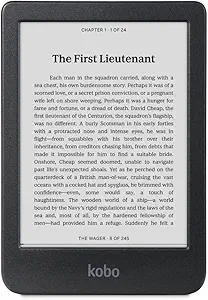
The Best Budget label is an editorial way to flag this compact black-and-white option for value-minded comparison; it is not a claim about its current price or a Black Friday discount. Its 6-inch glare-free touchscreen and built-in ComfortLight PRO give you a straightforward set of listed screen details to weigh. Someone who prefers a smaller display may find that format more appealing than a 7-inch screen, while another reader may prioritize the larger stated display. The useful question is which size feels appropriate for the material and reading settings you have in mind.
The listing specifies 16GB of storage and support for EPUB, PDF, and MOBI. Those details are particularly relevant if you already have reading material in those formats: compare the listed format names with your own library before choosing. Bluetooth wireless technology for audiobooks is also specified, making this the option to examine if wireless audiobook listening is part of your plan. The facts do not specify further audio arrangements, so avoid assuming details beyond that stated Bluetooth support.
Battery average life is listed as two weeks, and the water-resistance claim is precise: waterproof for up to 60 minutes in up to 2 metres of water. These claims can help you decide whether the stated terms fit your expectations, but they should not be stretched into a promise about every use situation. During Black Friday, compare the exact Clara BW configuration and offer with your shortlist rather than treating the Best Budget label as evidence of a lower live price. This pick earns its place in the guide through its listed display, storage, formats, and audiobook connectivity—not an assumed saving.
Key specs
| Display | 6” Glare-Free Touchscreen |
| Lighting | Built-in ComfortLight PRO |
| Storage | 16GB of Storage |
| Water resistance | waterproof for up to 60 minutes in up to 2 metres of water |
| Audiobook connectivity | Bluetooth wireless technology for audiobooks |
| Battery life | Battery Average Life 2 weeks |
| Supported formats | EPUB, PDF, MOBI |
Kobo Clara Colour
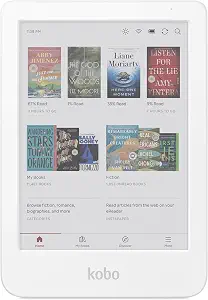
The Best for Color E Ink label identifies the clear reason to consider this option: its 6-inch E Ink Kaleido 3 display. If color is important to the pages you expect to read, that screen type gives you a concrete point of difference to investigate. A reader focused on black-and-white text may instead give more weight to screen size, lighting, or the other listed details. The color label is an editorial fit for a particular preference, not a claim that every kind of content will benefit from a color display.
ComfortLight PRO automatically reduces blue light throughout the day, and Dark Mode is listed as a reading mode. These are separate display-related details to consider alongside the screen itself: one concerns automatic light adjustment, while the other names an available mode. The listing also specifies 16GB of storage and audiobook support. It does not state Bluetooth connectivity for this model, so if wireless listening is essential, compare that detail carefully rather than assuming the support works in a particular way.
The stated battery life is two weeks. Its waterproof wording matches a specific limit: up to 60 minutes in up to 2 metres of water. Keep both claims in their stated terms when deciding whether they suit your routine. For Black Friday, first confirm that the offer concerns this color-screen model, then decide whether color E Ink is a priority worth including in your comparison. This pick is most compelling as a shortlist candidate when the display itself matters to you; its Best for Color E Ink designation does not make it a universal upgrade over a black-and-white reader.
Key specs
| Display | 6” E Ink Kaleido 3 display |
| Storage | 16GB of storage |
| Lighting | ComfortLight PRO automatically reduces blue light throughout the day |
| Reading mode | Dark Mode |
| Waterproof rating | waterproof for up to 60 minutes in up to 2 metres of water |
| Audiobooks | Audiobook Support |
| Battery life | 2 weeks |
Choose a reading scene before a device
Picture the moments when you expect to use an e-reader. Perhaps most sessions are quiet stretches with a novel, or perhaps you want to look at pages where color could matter. A display preference can eliminate options early: the Paperwhite lists a 7-inch Paperwhite display, the Clara BW a 6-inch glare-free touchscreen, and the Clara Colour a 6-inch E Ink Kaleido 3 display. Those labels describe different screen choices; they do not tell you which will feel best for your particular books. Think about the content you want to return to and whether color is a priority or simply an interesting extra.
Next, consider whether screen tone and lighting options will shape your routine. One model adjusts from white to amber; the two Kobo listings identify ComfortLight PRO, with the color model specifically noting automatic blue-light reduction throughout the day. Dark Mode is listed for that color model as well. These are useful distinctions to compare with your own preferences, not reasons to assume one setting suits everyone. Black Friday browsing can put many product details side by side, but deciding which screen characteristics matter first makes that comparison less distracting. A feature you would use often may deserve more weight than one that merely sounds appealing.
Let your existing reading material narrow the options
Your library can provide a practical way to reduce the shortlist. The Clara BW lists EPUB, PDF, and MOBI support, so compare those names with the formats of material you already expect to read. The other provided details do not specify format support for the two Kindle and color-screen picks. That is not proof that a format is or is not available; it means you should seek the relevant information for the exact device before relying on it. Make a short list of the formats that matter to you and verify each one against the listing or other product information you are considering.
Storage and listening are related to how you use a reader, but they are not interchangeable questions. Each of the three products here lists 16GB of storage. The Clara BW specifies Bluetooth wireless technology for audiobooks, while the Clara Colour lists audiobook support without specifying Bluetooth. The Kindle details provided here do not state audiobook features. If listening matters, distinguish the exact connectivity or support statement you need from a general mention of audiobooks. For Black Friday, keep those checks attached to the product configuration you plan to buy; a similar name or nearby listing is not enough to establish that its details match.
Treat endurance and water wording as buying details
Battery claims are most useful when read in their original terms. The Paperwhite says a single charge via USB-C lasts up to 12 weeks. The Clara BW lists an average battery life of two weeks, and the Clara Colour states two weeks. These descriptions are not phrased identically, so avoid turning them into a direct promise about your own charging schedule. If you often read away from a charging point, endurance may be important to your shortlist, but the stated figure is only one part of that decision. Decide what claim you are comparing, and do not assume the same conditions or wording where none are provided.
Water details also deserve precise reading. The Kindle is described as waterproof, with no depth or duration specified in the supplied facts. Both Kobo models say waterproof for up to 60 minutes in up to 2 metres of water. Keep that qualification intact rather than generalizing it into a guarantee for every kind of exposure. These statements may matter if water resistance is a priority, but they do not replace checking the exact product information for the conditions you have in mind. When a Black Friday listing emphasizes one of these claims, compare the wording with the model you shortlisted and avoid treating a broad headline as more specific than the stated detail.
Use Black Friday to verify the exact configuration
A seasonal promotion can make it tempting to start with the displayed offer and work backward to a product. A more reliable sequence is to choose the device and variant first, then check whether the offer actually applies to it. For this guide, that means distinguishing the 2024 Kindle Paperwhite 16GB in black from the Clara BW and Clara Colour. Confirm the model name and any configuration details shown on the listing before comparing the terms. The available facts do not establish a current promotion, discount, or price, so no label in this guide should be read as one.
Once the product identity is clear, compare the offer details available to you with the features that drove your shortlist. If you selected the Paperwhite for its display and adjustable tone, make sure the offer is for that model. If the Clara BW’s listed formats or Bluetooth audiobook connectivity mattered, do not let a different configuration substitute for those checks. If color E Ink was the deciding point, verify that the listing is for the color-screen device. Black Friday is a useful time to revisit your priorities, but an attractive-looking offer is only relevant if the exact product still fits them.
Give editorial labels the right amount of weight
Best Overall, Best Budget, and Best for Color E Ink are guide labels that help organize these three choices. They are editorial selections within this group, not results from testing, market-wide awards, or statements about which product is cheapest. The Best Overall label points readers toward the Paperwhite’s stated combination of display, adjustable tone, and distraction-free setup. Best Budget marks the Clara BW as a value-minded candidate to compare, without asserting anything about its current cost. Best for Color E Ink draws attention to the Clara Colour’s display type.
Use those labels to find a starting point, then ask whether the supporting feature actually addresses your needs. A color screen is meaningful if color pages are a priority; it may matter less if your reading is centered on text. Listed audiobook support is not the same as a stated connection method, and a battery claim is not a universal estimate of your personal experience. This approach also keeps Black Friday comparisons grounded: the guide can help you identify what to inspect, but the actual listing must establish the current model and offer details. Your shortlist should reflect your habits, not an award-style label alone.
Make the final comparison about everyday fit
Before choosing, write down the two or three characteristics you would notice most often. They might be a particular screen size, color E Ink, adjustable display tone, specified file formats, audiobook connectivity, or a stated water-resistance limit. Then separate essentials from preferences. If format support is essential, verify it rather than inferring it from a brand or model family. If a lighting adjustment is simply a nice option, give it appropriate weight instead of letting it outrank a more important need. The aim is not to award every feature equal value; it is to understand which details change your daily reading choice.
Finally, revisit the exact listing when you are ready to purchase. Confirm the model and variant, read the offer terms, and compare the claims using their original qualifications. Black Friday can be a convenient moment to make that last check, but it does not make an unverified configuration a match. If the available offer does not apply to the device on your shortlist, return to the product comparison rather than changing your priorities just to fit a promotion. A deliberate decision can leave you with the reader that suits your material and routine, even when the best choice is not the one with the most features.
Make your Black Friday choice
The strongest e-reader choice here depends on what you want the screen and supporting details to do. Consider the Paperwhite if its 7-inch display, adjustable white-to-amber tone, and distraction-free setup fit your routine; consider the Clara BW if its listed formats or Bluetooth audiobook connectivity matter; and look to the Clara Colour if color E Ink is central to your reading. Keep battery and water claims in their stated terms, and verify the precise model before acting on a Black Friday offer. These steps turn a broad category comparison into a practical shortlist without assuming that one pick fits every reader.