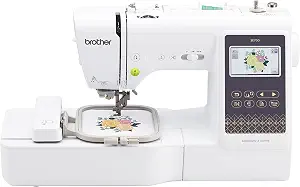
Brother SE700 Sewing and Embroidery Machine
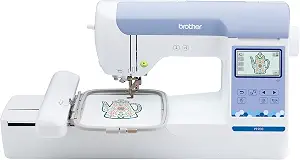
Brother PE900 Wireless Embroidery Machine with WLAN
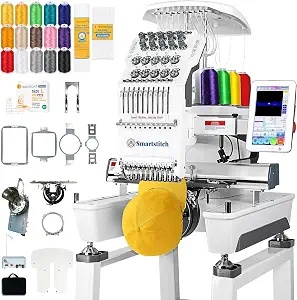
Smartstitch S-1001 Upgraded Embroidery Machine
Best Embroidery Machine Buying Guide — Black Friday Deals 2026
An embroidery machine purchase begins with the object you want to decorate and the work you expect the machine to do. A personalized garment, a larger panel, and a project that also needs ordinary sewing can point toward different configurations. This guide covers a combination sewing-and-embroidery model, an embroidery-only option, and a machine with a larger listed embroidery area and multiple needles. For Black Friday, treat a banner as a reason to compare—not as proof of a discount or a particular configuration. Check the exact model and listing against the work you have in mind, then weigh the available design and file-transfer routes.
Brother SE700 Sewing and Embroidery Machine
The Brother SE700 is the combination choice in this group: it handles sewing as well as embroidery. That pairing may suit a project plan that moves between decorating an item and sewing seams, hems, or other construction details. It has 103 built-in sewing stitches, including 10 styles of one step auto-size buttonholes, and comes with 8 sewing feet. For embroidery, the listed field is 4" x 4". Before adding it to a Black Friday shortlist, picture the placement of the design on the finished item. A compact field can be a sensible fit when the motifs you plan to use fit that area; it is a mismatch if your intended design requires more space than the stated field.
The design library includes 135 built-in designs and 10 embroidery lettering fonts, so there are on-machine choices for motifs and lettering. A 3.7-inch LCD color touchscreen is the listed display. If you plan to bring in embroidery files, the provided transfer route is to send them from a PC using the free downloadable Design Database Transfer software. That gives the buying decision two distinct parts: whether the supplied designs and fonts suit your plans, and whether the PC-based transfer route fits the way you want to prepare additional files. Do not assume a different transfer method from the information here; verify the exact listing if another workflow matters to you.
Best Budget is the editorial label for the SE700 among these featured machines, not a claim about its current price or a market-wide award. Its defining fit is the combination of sewing and embroidery functions, with a stated field and sewing features to consider together. That may make it worth comparing when one purchase needs to cover both types of work, rather than when the priority is an embroidery-only setup. During Black Friday, confirm the listing identifies the SE700 and compare its included functions with your actual project list. If most of your planned work is embroidery and needs a larger area, examine the other options instead; if you also need sewing functions, decide whether the SE700’s listed combination and design workflow answer that need.
Key specs
| Embroidery designs | 135 built-in designs and 10 embroidery lettering fonts |
| Sewing stitches | 103 built-in sewing stitches including 10 styles of one step auto-size buttonholes |
| Embroidery field | 4" x 4" embroidery field |
| Touchscreen | 3.7-inch LCD color touchscreen |
| Wireless transfer | Transmit embroidery files from your PC to your embroidery sewing machine via the free downloadable software Design Database Transfer(1) |
| Included feet | 8 sewing feet |
Brother PE900 Wireless Embroidery Machine with WLAN
Check Price on Amazon
The Brother PE900 is an embroidery-only machine; it does not function as a traditional sewing machine. That distinction is the first filter for this model. If your plan calls for embroidery and you already have a separate way to do sewing—or do not need sewing as part of this purchase—the PE900 can stay on the shortlist. If you expect one machine to cover ordinary sewing too, its stated role makes it the wrong configuration to choose for that requirement. Black Friday shopping can make it tempting to start with a promotion banner, but start here instead: identify whether embroidery alone matches the job.
For design placement, the PE900 has a 5” x 7” maximum embroidery area. The onboard collection includes 193 built-in embroidery designs and 13 lettering fonts: 9 English, 3 Japanese, and 1 Cyrillic. Its listed display is a 3.7-inch LCD display. These details help frame practical questions before purchase: will the designs you expect to stitch fit the maximum area, and are the included motifs and lettering useful for your projects? The model also offers a mobile-app route to access 50 free embroidery designs, make custom embroidery patterns by drawing on a mobile device, or download patterns from the collection and transfer them wirelessly to the machine. The listing also describes PC transfer through free downloadable Design Database Transfer software, or connection through the built-in USB port.
Best Overall is the editorial label assigned here among the featured products, not a test result or a claim that the PE900 suits every buyer. Its case rests on the embroidery-only role alongside the stated area, built-in designs, lettering options, and several listed ways to work with designs. Those features can make it a strong candidate when the planned workflow centers on embroidery and the available transfer routes fit your habits. During Black Friday, compare the exact PE900 listing and configuration with your needs rather than assuming the label signals a particular price or offer. Keep the sewing distinction in view, then assess your design placement and whether you prefer onboard options, PC transfer, USB, or the app’s stated capabilities.
Key specs
| Machine type | The PE900 is an embroidery-only machine and does not function as a traditional sewing machine |
| Embroidery area | 5” x 7” maximum embroidery area |
| Wireless transfer | Transmit embroidery files from your PC to your embroidery machine via the free downloadable software Design Database Transfer(1), or connect via the built-in USB port |
| Built-in designs | 193 built-in embroidery designs |
| Lettering fonts | 13 lettering fonts (9 English, 3 Japanese, and 1 Cyrillic) |
| Display | 3.7-inch LCD display |
| Mobile app | Access 50 free embroidery designs, make custom embroidery patterns by drawing on your mobile device, or download patterns from the collection and transfer them to your PE900 wirelessly |
Smartstitch S-1001 Upgraded Embroidery Machine
Check Price on Amazon
The Smartstitch S-1001 is the option to examine when the planned work calls for a large listed embroidery area. Its embroidery area is 9.5"x14.2", and the machine has 10 needles. Those details make project scale and workflow central questions: sketch where the embroidery will sit on the finished item, then check whether that placement falls within the stated area. The listed maximum speed is 1200SPM, but a speed figure alone cannot tell you whether a particular machine suits your materials, designs, or working style. Black Friday comparisons should keep the full configuration in view, not rely on one headline specification.
The machine has a 7" touch screen, auto thread trimming, auto color changing, and thread break detection. Treat these as workflow features to weigh against the way you expect to prepare and stitch designs; they do not remove the need to check that a project’s design and materials are suitable. The provided file-transfer information names DST/DSB files and says they can be moved from a computer to the machine with USB/WiFi. If your planned design library depends on a particular file type or transfer path, confirm that it matches this listed route before deciding. The stated material list includes denim, canvas, leather, vinyl, caps, shoes, and bags, which gives concrete starting points for considering the types of projects you may want to take on.
Best for Larger Embroidery Projects is the editorial label for the S-1001 in this guide, grounded in its listed 9.5"x14.2" embroidery area. It is not a claim of measured superiority or a promise that every large item will fit. Check the exact design placement, the object’s shape, and the listed material information against the project at hand. The 10-needle setup and automatic functions may also matter to your workflow, while the file formats and transfer choices deserve their own check. For Black Friday, verify that the listing is for the S-1001 configuration you mean to buy and review the offer details; no deal amount or availability can be assumed from the model name alone.
Key specs
| Needles | 10 Needles |
| Max speed | 1200SPM Max Speed |
| Touch screen | 7" Touch Screen |
| Embroidery area | 9.5"x14.2" Embroidery Area |
| Automatic functions | Auto thread trimming; Auto color changing |
| Thread detection | Thread break detection |
| Compatible file transfer | DST/DSB files from your computer to the machine with the USB/WiFi |
| Materials | can stitch on denim, canvas, leather, vinyl, caps, shoes, bags |
Let placement and object shape narrow the field
Start with a real project, not a vague ambition to embroider more. Write down the object, where the design will go, and whether that part of the object can be positioned within the machine’s stated embroidery area. A motif placed on a small section of a garment raises a different question from a design intended to cover a broad panel. The SE700 lists a 4" x 4" field, the PE900 a 5” x 7” maximum area, and the S-1001 a 9.5"x14.2" area. These are product specifications, not guarantees that a particular object or design will be easy to hoop or position. Consider shape and placement as well as the design’s dimensions.
Use Black Friday browsing to check configurations against that project sketch. A listing may draw attention to a machine’s most appealing feature, but the useful question is whether the exact model’s area matches your intended placement. If you have several projects, sort them by the largest design area they genuinely require rather than choosing a machine for a hypothetical future project. Also avoid assuming that a larger listed area settles every material-handling question. The S-1001 lists several materials, while the other records here do not provide comparable material lists; that is a reason to verify what matters for your work, not to infer unlisted capabilities.
Decide where sewing fits in the purchase
Separate the sewing task from the embroidery task before comparing models. The SE700 is identified as a sewing and embroidery machine and lists 103 built-in sewing stitches, including 10 styles of one step auto-size buttonholes, plus 8 sewing feet. The PE900 is explicitly embroidery-only and does not function as a traditional sewing machine. The Smartstitch record describes embroidery functions and does not establish a traditional sewing function. If a project involves constructing or altering an item as well as decorating it, decide whether you need both functions in the purchase or have another arrangement for sewing.
This is a practical Black Friday filter because a prominent deal can distract from a basic mismatch. A buyer seeking a single machine for sewing and embroidery should pay close attention to the SE700’s stated role. A buyer shopping specifically for embroidery can consider the PE900’s role without expecting it to sew. Do not treat silence in a product description as proof that a feature is unavailable; instead, verify any essential function against the exact listing. Make a short list of must-haves first, then compare the models that actually address them. That keeps a bonus feature from taking priority over the work the machine needs to do.
Match design preparation to a route you can use
A built-in library is only one part of a design plan. The SE700 lists 135 built-in designs and 10 embroidery lettering fonts, and its described PC transfer route uses the free downloadable Design Database Transfer software. The PE900 lists 193 built-in embroidery designs and 13 lettering fonts, with the language breakdown specified; it also describes PC transfer through Design Database Transfer, a built-in USB port, and mobile-app features. The S-1001’s record instead names DST/DSB files and USB/WiFi transfer from a computer. Each route may shape how you source and prepare designs, so check what you expect to use rather than assuming every machine handles files the same way.
For Black Friday, think through a complete design path: where the pattern comes from, what device you use to prepare it, and how it reaches the machine. For the PE900, the listed app can access 50 free embroidery designs, support drawing custom patterns on a mobile device, or download patterns from its collection for wireless transfer. That may matter to someone who wants those specific options. For the other models, rely on their stated routes and confirm any further requirement directly in the listing. Built-in designs and lettering can help when the available choices fit your project, but do not assume a library contains a particular motif unless you have verified it.
Separate workflow conveniences from project requirements
Convenience features are worth considering after the essential project fit is clear. The S-1001 lists auto thread trimming, auto color changing, and thread break detection, along with a 7" touch screen. Those details describe functions to weigh when planning how you will manage embroidery work; they do not guarantee a specific result or eliminate the need to prepare a suitable design. The SE700 and PE900 list 3.7-inch displays, with the SE700 specified as a color touchscreen. Compare these display descriptions with how you prefer to interact with a machine, while avoiding assumptions about unlisted controls or functions.
Make a Black Friday comparison sheet that distinguishes must-haves from preferences. Put embroidery area, machine role, and the design-transfer route in the must-have column if your project depends on them. Put convenience features in a separate column so they do not obscure a mismatch in area or function. The S-1001 lists a maximum speed of 1200SPM, but that single figure should not replace questions about design placement, materials, and file handling. Likewise, a touchscreen may be useful to your routine, but it does not by itself determine whether a project is a fit. Confirm each deciding detail on the exact model listing.
Use a Black Friday offer check before choosing
Treat the advertised offer and the machine specification as separate parts of the decision. Check that the product name and model match the one on your shortlist, and make sure the listing describes the functions you expect. Then review the displayed offer details directly: this guide does not establish a current price, discount, stock status, or promotion. A Black Friday label alone cannot tell you whether the configuration is right for your work. Compare the exact offer with the features you have decided matter, rather than with a general impression that one machine looks like a better deal.
Before you commit, revisit your project notes. Confirm whether you need sewing as well as embroidery, whether the design placement fits the listed area, and whether your preferred way of moving files is stated. Check any material requirement against the provided product information and verify unresolved essentials in the listing. Finally, decide which tradeoff you can accept: the SE700’s combination role and stated field, the PE900’s embroidery-only role and listed design routes, or the S-1001’s larger stated area and described workflow features. This sequence keeps the purchase anchored to your planned work instead of an assumed saving.
Make your Black Friday choice
A useful shortlist is the one that rules out the wrong configuration before an offer influences the decision. Match the machine’s role to your sewing needs, check the design’s placement against the stated embroidery area, and make sure the listed design workflow fits how you prepare files. The SE700 brings sewing and embroidery together; the PE900 is explicitly embroidery-only; and the S-1001 is the featured choice for a larger listed embroidery area. For Black Friday, verify the exact listing and offer rather than assuming a promotion, then choose the machine whose documented features fit the projects you actually plan to make.