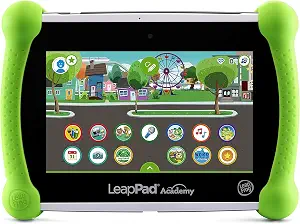
LeapFrog LeapPad Academy Kids’ Learning Tablet, Green
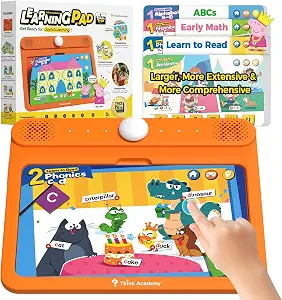
Think Academy Interactive Learning Tablet Pad with Flash Cards for Kids 3-5
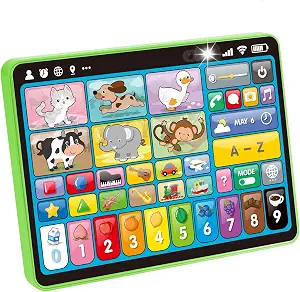
hahaland 5-Language Learning Tablet Toy for Toddler 1-3 with Speech Therapy
Best Early Tablet Buying Guide — Black Friday Deals 2026
“Tablet” can describe very different activities for young children: a Wi-Fi-connected device with a screen, a screen-free learning panel with cards, or a sound-and-language toy with interactive icons. This guide separates those formats so you can start with the activity your household actually wants. The LeapFrog option is intended for ages 3-8 years; the other two have toddler or preschool age guidance and no screen. That distinction matters more than the shared tablet label. For Black Friday, compare the exact item and its stated contents rather than assuming every product in this category does the same job. Choose a format first, then decide whether its age guidance, themes, languages, and setup details fit.
LeapFrog LeapPad Academy Kids’ Learning Tablet, Green
Check Price on Amazon
This is the guide’s Best Overall pick as an editorial choice among the three products, not a claim that it has been tested or is best for every family. It is the option here that most clearly matches a shopper looking for a children’s learning device with a screen: it has a 7" shatter-safe screen, 16 GB of storage, and Wi-Fi. Its stated age range is 3-8 years, making that guidance a useful first check if the intended user is in that span. If you are browsing early Black Friday offers, keep this screen-based format distinct from the two screen-free alternatives rather than comparing them as interchangeable devices.
The listed accessory is a removable silicone bumper with a kickstand, and a USB Type-C cable is included. Those specifics help you understand what the package describes, but they do not answer every setup question. Check the exact listing and selected variant to confirm the package details shown for the offer you are considering. The included three-month trial of LeapFrog Academy is another concrete point to weigh: it gives the purchase a defined learning-app component, while the listing also says that hundreds more games, videos, music, and eBooks are sold separately. Treat that as a distinction between the trial and additional content, not as a promise that every title is included.
A sensible everyday fit is a child whose caregiver wants a screen-based learning device and values the listed kickstand and included app trial. The tradeoff is format: if your priority is a screen-free activity, this is not the match suggested by the other two products. If you are comparing it during Black Friday, look at the full item identity, the stated 16 GB storage, accessories, and content terms together. The Best Overall label is a shortlist aid based on this product’s combination of listed device features; it does not establish a measured winner, a deal price, or a universal recommendation.
Key specs
| Age range | Intended for ages 3-8 years |
| Screen | 7" shatter-safe screen |
| Storage | 16 GB |
| Connectivity | Wi-Fi |
| Included accessory | Removable Silicone Bumper With Kickstand |
| Included cable | USB Type-C Cable |
| Learning app trial | Includes a three-month trial of LeapFrog Academy |
| Additional content | Find hundreds more games, videos, music and eBooks (sold separately) |
Think Academy Interactive Learning Tablet Pad with Flash Cards for Kids 3-5
Check Price on Amazon
Best for screen-free learning cards is the most specific label for this choice. The Think Academy panel is explicitly screen-free and has an 11'' large panel, with three listed play modes: Exploration Mode, Game Mode, and Hints Mode. Its included learning cards are itemized by topic: Early Math (20 pages), Learn to Read (20 pages), Sing Along & ABCs (10 pages), and Speak and Spell (20 pages). That level of detail lets a shopper compare the actual material with a child’s current interests instead of relying only on a broad description such as educational toy.
The listed age guidance is 3 years and up, so it offers a different starting point from the product recommended for ages 12 months – 3 years. Three AA batteries are required. The information does not say whether batteries are included, so check the exact package details rather than assuming either way. The card-based activity and modes also set it apart from the LeapFrog screen device and the other no-screen product, which is organized around interactive icons and language options. Think about whether you want printed learning-card topics to shape the activity, or whether a different format better suits the child’s attention and your plans.
This is the guide’s screen-free choice for shoppers who want specified card sets and activity modes, not a claim that it outperforms other products. For early Black Friday comparisons, confirm the selected item and the included card topics in the exact offer. A similar category name alone does not tell you whether the package has the learning cards that matter to you. Also account for the stated battery requirement when considering setup. If the age guidance, card subjects, and screen-free format line up with your needs, this option gives you a concrete set of details to evaluate without needing to assume features that are not listed.
Key specs
| Screen | Screen Free |
| Panel | 11'' Large Panel |
| Play modes | Exploration Mode, Game Mode, and Hints Mode |
| Included learning cards | Early Math (20 pages), Learn to Read (20 pages), Sing Along & ABCs (10 pages), Speak and Spell (20 pages) |
| Age range | 3 years and up |
| Batteries | 3 AA batteries required. |
hahaland 5-Language Learning Tablet Toy for Toddler 1-3 with Speech Therapy
Check Price on Amazon
The Best Budget designation is an editorial label for this guide, not a statement that this is the lowest-priced option or a confirmed bargain. This no-screen toddler tablet is specified for manufacturer-recommended ages 12 months – 3 years. Instead of a display, it uses 39 interactive icons that read out words and play sounds. Its listed 90+ fun modules cover animals, shapes, musical instruments, vehicles, letters, numbers, and colors. For a household seeking a young-child activity organized around spoken words and sounds, those details make the format easy to distinguish from a conventional screen device.
Its languages are English, French, Spanish, German, and Italian. The product information also describes a no-screen format that supports English, Spanish, and French with just one press; keep that more specific statement in mind when checking the language functions you care about. Four modes are listed: Learning Mode for basic concepts, Quiz Mode for problem-solving skills, Music Mode to spark creativity, and Pretend Play Mode with icons such as a phone and camera. These are the stated activity types, not a guarantee about how a particular child will respond to them. Consider whether the language options and modes suit the intended routine before deciding that a large module count is the deciding factor.
This pick may suit a caregiver who prefers a screen-free toddler activity with multiple subject areas and modes, and who is shopping within the stated age guidance. Its limitations for your shortlist may be practical rather than technical: it does not match a request for a 7" screen, Wi-Fi, or storage, which are features of another item in this guide. During Black Friday, compare the exact product and listing details without treating the Best Budget label as evidence of a current discount. Check the displayed offer and variant, then decide whether the language list and interactive format are worth prioritizing for your household.
Key specs
| Age range | Manufacturer recommended age 12 months – 3 years |
| Learning content | 90+ fun modules covering animals, shapes, musical instruments, vehicles, letters, numbers, and colors. |
| Languages | Available in English, French, Spanish, German, and Italian |
| Modes | Learning Mode to teach basic concepts, Quiz Mode to build problem-solving skills, Music Mode to spark creativity, and Pretend Play Mode with fun icons like a phone and camera. |
| Screen | This no-screen toddler tablet supports English, Spanish, and French with just one press. |
| Interactive icons | With 39 interactive icons, it reads out words and plays sounds |
Pick the activity format before weighing the features
Start by deciding what “tablet” should mean in your home. One option here is a screen-based learning device with Wi-Fi and storage. The other two are explicitly screen-free, but they organize interaction differently: one lists learning cards and modes, while the other lists interactive icons, sounds, languages, and several modes. That is a more useful first distinction than trying to rank all three on a single scale. If you want a display, the two no-screen products do not meet that preference; if you want a screen-free activity, the LeapFrog format may not fit your plan.
Picture the moment you want the product to fill. Are you looking for a screen-based activity that includes a learning-app trial, a card-led activity with named subject sets, or a no-screen toddler toy with spoken words and sounds? These are questions of fit, not claims about which format children prefer. Black Friday browsing can make it tempting to begin with a deal label, but the format filters out mismatches before price enters the decision. Once you know which kind of activity belongs in your routine, compare only the relevant listed details and the exact offer.
Use age guidance as a starting point, not the whole decision
The age descriptions are not identical, so treat them as useful shortlist context. The LeapFrog device is intended for ages 3-8 years; the Think Academy product is for ages 3 years and up; and the hahaland listing gives a manufacturer-recommended age of 12 months – 3 years. These statements help identify which products are positioned for different stages, but they do not replace your judgment about the child who will use the item. If age guidance does not align with your intended user, pause before letting a Black Friday offer sway the choice.
After checking the age range, look at the activity itself. A child in a stated age range might encounter screen-based learning, printed cards, or interactive icons, depending on the product. The material and presentation are separate decision points from age. Consider whether you are choosing for a toddler or preschooler, and whether the listed topics and modes sound appropriate for the kind of activity you want to provide. Avoid assuming that a broader age span means a better fit; the product’s exact content and format still matter. Use the age guidance to narrow options, then make the final choice around your priorities.
Match the listed subjects and languages to your priorities
The content descriptions offer different ways to narrow the shortlist. Think Academy names Early Math, Learn to Read, Sing Along & ABCs, and Speak and Spell cards. The hahaland toy lists modules covering animals, shapes, musical instruments, vehicles, letters, numbers, and colors, as well as English, French, Spanish, German, and Italian. The LeapFrog listing describes a three-month LeapFrog Academy trial and says additional games, videos, music, and eBooks are sold separately. These are not equivalent content packages, so compare the actual material rather than counting broad subject categories.
For a Black Friday decision, ask which stated content would make the item useful to you after purchase. If language choice is important, read the language details carefully, including the more specific note that the no-screen toddler tablet supports English, Spanish, and French with just one press. If named learning-card topics matter, check that the chosen Think Academy listing identifies those cards. For LeapFrog, distinguish the included trial from additional content sold separately. This approach keeps the comparison tied to what is described and avoids assuming that unlisted content is included.
Check package and power details against your setup
A product’s format is only one part of practical fit. The LeapFrog listing names a removable silicone bumper with kickstand and a USB Type-C cable, alongside its 7" shatter-safe screen, 16 GB storage, and Wi-Fi. The Think Academy listing says three AA batteries are required. No battery-inclusion detail is provided here, so inspect the exact listing if that affects your plans. These different setup details should not be treated as a direct quality comparison; they simply help you anticipate what the stated package or power requirement involves.
Before a Black Friday purchase, confirm that the product identity and selected variant match the details you used to make your decision. Check whether the listed accessory, cable, learning cards, or stated trial appears with the offer you are viewing. Avoid filling in gaps from assumptions: the available information does not settle every package or setup question. For the screen-free hahaland item, focus on its listed modes, languages, icons, and age guidance rather than imagining a screen or other unlisted equipment. Reading the exact offer carefully is more useful than relying on a generic category description.
Compare Black Friday offers on the same terms
A sale label does not by itself show whether an item suits your needs. Compare the exact product and variant, then review the features that drove your shortlist: screen or no-screen format, age guidance, included material, languages, and any stated accessory or power requirement. Do not assume that two listings with similar wording have the same package. If an offer is displayed for one selection, make sure that is the selection you intend to buy before comparing it with another product.
Keep the comparison grounded in the information shown for each offer. You can check the current displayed price against other options available to you, but this guide does not establish a discount, a historical price, or a promotion. Consider the LeapFrog app trial separately from additional content sold separately, and consider the Think Academy battery requirement separately from the card topics. For the toddler toy, weigh the stated module themes and languages. A Black Friday decision that still makes sense without a deal is usually one where the activity format and package details already meet your priorities.
Make your Black Friday choice
The clearest shortlist begins with the kind of activity you want: a screen-based learning device, a screen-free panel with learning cards, or a no-screen toddler toy built around icons, words, and sounds. Then use each product’s age guidance, content details, and setup information to rule out mismatches. The labels in this guide are editorial choices among these three options, not proof of measured superiority or a current promotion. As Black Friday offers appear, verify the exact item and package and compare only the details that matter to your household. A well-matched format is a better reason to choose than the tablet label alone.