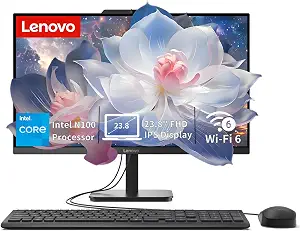
Lenovo IdeaCentre All-in-One Desktop Computer
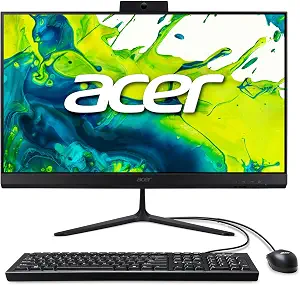
Acer Aspire C27 AIO Desktop
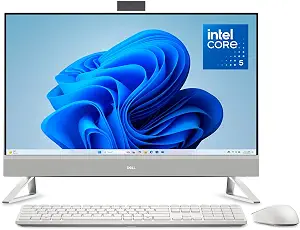
Dell 27" All-in-One Desktop, FHD, Intel Core 5 120U, Windows 11 Home
Best All In One Computer Buying Guide — Black Friday Deals 2026
How much of your desk do you want one computer to handle, and which details would make an all in one computer the wrong fit? These three options differ in screen size, processor, memory, camera details, and the amount of storage information provided. That makes it worth matching the listing to your routine rather than choosing by appearance alone. For Black Friday, compare the exact model and configuration shown before weighing an offer; a sale label cannot tell you whether its screen or connections suit your workspace. The Lenovo has a 23.8-inch display and 8GB of memory, while the Acer and Dell have 27-inch screens and 16GB of memory. Their other listed details help separate a compact everyday setup from a larger-screen choice or a camera-focused one.
Lenovo IdeaCentre All-in-One Desktop Computer
Best Budget is the editorial role assigned to the Lenovo IdeaCentre All-in-One Desktop Computer in this group. It is not a statement about its current price or a claim that it is the least expensive option. The listing gives it an Intel N100 processor, featuring 4 cores, 4 threads, up to 3.4GHz turbo, and 6MB cache, together with 8GB DDR5 memory and a 512GB PCIe SSD. Those details give a shopper a defined baseline for a desk used for everyday computing, but the processor and memory figures alone cannot promise a particular experience. Think about the applications and multitasking you expect, then decide whether this configuration is a sensible match.
Its 23.8-inch Full HD IPS anti-glare display sets it apart from the 27-inch screens in the other listings. That smaller stated screen size may be worth considering when desk space is a priority; measure your available space and check the product page for the computer’s physical dimensions rather than assuming the screen size tells the whole story. The anti-glare description is another listed detail to weigh if reflections are a concern in your room. For Black Friday, compare the exact Lenovo configuration and offer rather than assuming a promotional label means it is a better fit.
The computer lists Windows 11 Home, Intel Wi-Fi 6 AX203, Bluetooth 5.2, and Gigabit Ethernet. Its stated ports are 1 USB-C 10Gbps, 2 USB-A 2.0, 2 USB-A 10Gbps, HDMI-out 1.4b, RJ-45, and a 3.5mm headset jack. Review that list against the equipment you intend to connect, and check the listing if a particular connection matters to your setup. This Lenovo is a useful candidate if the 23.8-inch display, stated memory, and specified connections align with your priorities. Its Best Budget label is only a buyer-fit designation within this article; check the exact Black Friday offer and configuration before drawing any conclusion about value.
Key specs
| Processor | Intel N100 processor, featuring 4 cores, 4 threads, up to 3.4GHz turbo, and 6MB cache. |
| Display | 23.8-inch Full HD IPS anti-glare display |
| Memory | 8GB DDR5 memory |
| Storage | 512GB PCIe SSD |
| Operating system | Windows 11 Home |
| Connectivity | Intel Wi-Fi 6 AX203, Bluetooth 5.2, and Gigabit Ethernet. |
| Ports | 1 USB-C 10Gbps, 2 USB-A 2.0, 2 USB-A 10Gbps, HDMI-out 1.4b, RJ-45, and a 3.5mm headset jack |
Acer Aspire C27 AIO Desktop
Best Overall is the editorial fit for the Acer Aspire C27 AIO Desktop among these three listings, not a claim of measured superiority. Its 27" Full HD IPS 120Hz display and AMD Ryzen 5 7430U Hexa-Core Processor make it a straightforward place to start if a larger screen and a named processor are central to your shortlist. It also lists 16 GB DDR4 memory and a 512GB PCIe SSD, so the key memory and storage details are both specified. For a household desk used for varied everyday tasks, those details may help you decide whether this configuration lines up with your needs. They do not establish how it will perform for any particular application, so consider the work you expect and avoid treating the label as a substitute for that judgment.
The screen is Full HD, not a higher resolution stated in the listing, and its 120Hz refresh rate is a distinct display detail to weigh alongside size. If your choice is mostly about having a 27-inch display, compare that preference with the actual room available on your desk. The supplied facts do not give the stand dimensions, so check the exact listing for the physical arrangement before committing. For Black Friday, keep the model and the stated screen configuration in view as you compare offers; a similar-looking listing may not be the same configuration.
Acer specifies Wi-Fi 6E for wireless networking and a 2 MP (1920 x 1080) webcam with 2 Microphones and Privacy Shutter. Those details can matter if you expect to use the built-in camera and microphones for calls, or prefer a privacy shutter. USB Keyboard and Mouse Included is also stated, which may simplify planning for a basic desk setup if those included items suit you. Confirm what the current exact listing says about the included accessories before checkout. The Best Overall label here reflects the combination of listed display, memory, storage, and camera details—not a universal ranking. During Black Friday, decide whether those particular features justify your choice, then verify that the product page still shows the same model and configuration.
Key specs
| Display | 27" Full HD IPS 120Hz Display |
| Processor | AMD Ryzen 5 7430U Hexa-Core Processor |
| Memory | 16 GB DDR4 |
| Storage | 512GB PCIe SSD |
| Operating system | Windows 11 Home |
| Wireless | Wi-Fi 6E |
| Webcam | 2 MP (1920 x 1080) Webcam with 2 Microphones and Privacy Shutter |
| Included accessories | USB Keyboard and Mouse Included |
Dell 27" All-in-One Desktop, FHD, Intel Core 5 120U, Windows 11 Home
Check Price on Amazon
Best for a Higher-Resolution Webcam is the editorial label for the Dell 27" All-in-One Desktop, FHD, Intel Core 5 120U, Windows 11 Home. The listed camera is 5MP+IR, a useful point of distinction if camera resolution is a central part of your decision. The facts do not describe additional camera functions, so confirm the exact listing if you need a particular capability. This label is based on the camera specification provided, not on a test or a claim about image quality in real use.
Dell lists a 27-inch display with a maximum resolution of 1920×1080 pixels, 16 GB RAM, and an Intel Core 5 120U processor. For someone choosing between screen area and camera detail, those specifications make the trade-off easy to frame: consider whether the display size, stated resolution, and webcam information match the tasks that matter to you. The supplied storage detail identifies the type as SSD but does not state a capacity. If capacity affects your decision, look for that information on the exact product page rather than estimating it or assuming it matches another computer here.
The listing also specifies Windows 11 Home and Total Usb Ports 5. That total does not identify the connector types, so check the full listing if your keyboard, mouse, headset, or other devices require particular ports. Treat that verification as part of your Black Friday comparison: confirm the Dell model, the camera description, the screen resolution, and any configuration details relevant to your purchase. The Best for a Higher-Resolution Webcam label points to one stated feature that may distinguish this option for your needs; it does not make the Dell the automatic choice for every desk. Decide whether its listed camera and screen details matter more to you than the more fully specified storage capacity or port types in another listing.
Key specs
| Display size | Display Screen Size 27 inches |
| Resolution | Display Resolution Maximum 1920×1080 pixels |
| Processor | CPU Model Number 120U |
| Memory | Memory Installed 16 GB RAM |
| Storage type | Hard Disk Description SSD |
| Operating system | Operating System Windows 11 Home |
| USB ports | Total Usb Ports 5 |
| Camera | 5MP+IR camera |
Begin with the work and the available desk space
An all in one computer puts the display at the center of the setup, so start by picturing where it will sit and what you will look at on it. The Lenovo lists a 23.8-inch Full HD IPS anti-glare display; both the Acer and Dell list 27-inch displays. Those facts identify different screen-size options, but they do not tell you how much room the complete computer takes up. Measure the place you have available and consult the exact listing for physical dimensions, stand arrangement, and any other placement details you need.
Then ask what the display will be used for: a shared household workspace, a dedicated desk, or a screen used alongside paper notes and other equipment. The Acer specifies Full HD IPS at 120Hz, while the Dell specifies a maximum resolution of 1920×1080 pixels. The Lenovo is also listed with Full HD resolution. Consider the resolution and refresh-rate information in the context of your actual use; do not assume a larger screen or a named refresh rate automatically makes one machine the right choice. Black Friday can make it tempting to focus on the screen first, but the exact display description and your available space should both be part of the decision.
Choose a configuration that fits your expected workload
The processor details vary, and the listings do not provide a common performance test for comparing them. Lenovo specifies an Intel N100 processor with 4 cores, 4 threads, up to 3.4GHz turbo, and 6MB cache. Acer names an AMD Ryzen 5 7430U Hexa-Core Processor. Dell identifies an Intel Core 5 120U in its product name and lists CPU Model Number 120U. Use those descriptions to identify the configurations you are considering, not as a guarantee about how a particular app will run.
Memory is another clear difference: Lenovo lists 8GB DDR5 memory, while Acer lists 16 GB DDR4 and Dell lists 16 GB RAM. Think about the applications you use together and the work you expect the computer to support. These specifications give you facts to compare, but they cannot establish the best amount for every person. Before a Black Friday purchase, make sure the model page shows the processor and memory you intended to choose. If you have a specific workload in mind, look for information about that workload rather than inferring performance from a product label or a single specification.
Separate storage capacity from storage type
Storage is not described to the same level of detail across all three listings. Lenovo and Acer each specify a 512GB PCIe SSD. Dell lists its hard disk description as SSD, which identifies a storage type but does not state a capacity in the supplied details. Keep those two questions separate: the kind of storage and the amount available are different facts. Do not assume Dell has the same capacity as either of the other computers simply because all three descriptions mention SSD storage.
Consider what you plan to keep on the computer, such as documents, downloaded files, or other personal material, and decide what capacity information you need before choosing. If the Dell is on your shortlist, check its exact product page for the capacity and configuration shown there. If you are comparing Black Friday offers, verify that the storage information belongs to the exact model in the offer, not just to another listing with a similar product name. A complete comparison should leave no important storage question hidden behind a general SSD description.
Match cameras, network details, and ports to your setup
For video calls, the provided camera descriptions give useful but different levels of detail. Acer lists a 2 MP (1920 x 1080) webcam with 2 microphones and a privacy shutter. Dell lists a 5MP+IR camera. The Lenovo facts provided here do not specify a webcam, so consult its exact listing if a built-in camera is important; do not treat missing information as confirmation of either presence or absence. Think through whether camera resolution, microphone details, or a privacy shutter is a deciding factor for your own routine.
Connection information also needs a careful reading. Lenovo names Intel Wi-Fi 6 AX203, Bluetooth 5.2, Gigabit Ethernet, and a detailed port list. Acer specifies Wi-Fi 6E, and Dell gives a total of five USB ports without listing their types in the provided facts. If your desk setup depends on a specific cable or wireless standard, verify that detail on the exact product page. Black Friday comparisons are more useful when you check the connection you need, rather than treating a general port count as a complete description.
Make the final Black Friday check about the listing itself
Before placing an order, revisit the precise model and configuration you selected. Confirm the screen description, processor, memory, and storage details against the product page, and make sure any camera or connection requirement you care about is explicitly addressed. Acer states that a USB keyboard and mouse are included; do not assume the other listings include the same accessories. If included items matter, verify them for the exact offer rather than relying on a general expectation about all in one computers.
Black Friday is a reason to compare the offer in front of you, not evidence that a particular configuration is discounted or available. Check that the product name and selected variant correspond to your shortlist, and review the displayed offer details before deciding whether it suits your budget and needs. Avoid comparing only by a recommendation label: Best Overall, Best Budget, and Best for a Higher-Resolution Webcam are editorial buyer-fit descriptions for this group. Your own priorities should determine which specifications deserve the most weight.
Make your Black Friday choice
A good shortlist starts with the details you would notice every day: the screen size, the processor and memory configuration, storage information, and the camera or connections needed at your desk. The Acer combines a 27" Full HD IPS 120Hz display with specified memory, storage, and webcam details; Lenovo offers a 23.8-inch anti-glare display and a detailed connection list; Dell identifies a 5MP+IR camera alongside a 27-inch display, while leaving storage capacity unspecified in the provided facts. For Black Friday, use an exact-listing checklist: confirm the model, selected configuration, required connections, included accessories, and any detail still missing from the description. Then choose the all in one computer whose verified facts best match your routine.