Amazon Echo Show 21 Buying Guide — Black Friday Deals 2026
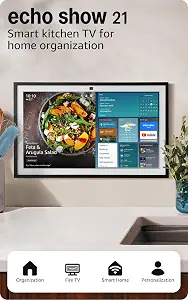
The Echo Show 21 makes the most sense when a household can give a large smart display more than one recurring job. Its 21" Full-HD (1080p) screen can show customizable widgets, provide access to built-in Fire TV, and put smart-home controls within reach by voice or a few taps. Those features point to a hub for shared information and entertainment, rather than a screen chosen for one occasional task. Before considering a Black Friday offer, decide which of those uses would genuinely fit your routine. Then check that the exact listing is for the Echo Show 21 and review what it includes, so the offer matches the setup you have in mind.
The Amazon Echo Show 21 combines a 21" Full-HD (1080p) smart display with customizable widgets, built-in Fire TV, smart-home controls, video calling, and camera privacy controls. That range can be useful when you want one screen to serve several household purposes. The better question is whether those purposes will come up often enough to justify choosing this model. If the display would mostly sit unused between occasional requests, its multiple functions may not match your priorities.
For a Black Friday shortlist, consider the whole feature mix rather than treating the screen size as the only reason to buy. The included Fire TV remote is relevant if you expect to watch shows on the display; widgets matter if you plan to revisit information during the day; and the dashboard is useful to consider if you want to control smart-home devices from a screen as well as by voice. A centered camera with auto-framing, wide field of vision, 3.3x zoom, and noise reduction technology may suit video calls, while the mic/camera-off button and built-in camera shutter provide privacy controls to weigh before choosing a place for it.
Give the screen a job that repeats
A 21" display can be a natural fit for a place where people regularly check shared information, but the useful details depend on what you choose to put on it. The Echo Show 21 supports customizable widgets to help keep your day on track. Think through which information you would actually want to revisit, and whether a shared screen would make it easier to see. That is a more grounded reason to consider this model than simply wanting the largest screen in a shopping comparison.
Before Black Friday, write down a few specific moments when the display could be useful: checking an item while preparing for the day, keeping selected information visible, or turning to it for entertainment later. These are planning prompts, not a promise that any particular widget or arrangement is available. The supplied details confirm customization, but do not specify individual widget options. If your plan depends on a particular type of information, verify it in the listing or product details before deciding. Otherwise, keep your expectations focused on the confirmed ability to customize widgets.
Decide whether Fire TV belongs in your plans
Built-in Fire TV adds a clear entertainment role to the Echo Show 21. The listed streaming options include Prime Video, Netflix, YouTube, Apple TV, and more, with a subscription potentially required. A Fire TV remote is included. Consider the services you already expect to use and whether watching them on this display would be part of your regular routine. The listed apps are examples, not a guarantee that every title is available without a subscription.
This is a useful point of comparison when reviewing a Black Friday listing: check the exact model and confirm the remote is included, then consider whether the streaming choices suit your plans. Do not treat a headline offer as a reason to add entertainment features you will rarely use. If you already have particular viewing habits, compare those with the stated app examples and remember that subscription requirements may apply. If widgets and household controls matter more to you, weigh those uses separately rather than assuming Fire TV alone settles the decision.
Tie voice and dashboard controls to real devices
The Echo Show 21 can control smart-home devices with your voice or a few taps using its smart-home dashboard. This gives buyers two listed ways to interact: speak a command or use the screen. Think about a task you would actually want to handle this way, such as making a control accessible on the display instead of relying only on voice. The product information does not identify specific device brands or compatibility details, so check your intended devices before purchase rather than assuming they will work.
A Black Friday price comparison is only useful if the product fits the household setup you want. Make a short list of the devices you hope to control and verify their support for this Echo Show 21 through the appropriate product information. If you have no such devices or no recurring control task in mind, the dashboard may be less important to your choice. If you do, consider whether voice, taps, or a mix of both would be convenient in the place where you plan to use the display.
Plan video calls and privacy together
For calls with family or friends, the listed camera features include a centered, auto-framing camera, a wide field of vision, 3.3x zoom, and noise reduction technology. Those are relevant details if you expect to use the display for video conversations. Consider who you would call and whether this kind of screen-based call fits the way you stay in touch. The feature description does not promise a particular call quality in every room or situation, so treat these details as functions to consider, not a guarantee of an outcome.
Privacy belongs in the same decision. The Echo Show 21 has a mic/camera-off button and a built-in shutter to cover the camera. Before a Black Friday purchase, decide whether those controls suit your preferences and how you would use them in the display’s intended location. The shutter covers the camera; the button is identified as a mic/camera-off control. Reviewing both helps make the choice more specific than judging calling features in isolation. If camera privacy is a priority, make sure you understand these controls and are comfortable using them.
Check the listing against your intended setup
A good offer is the one that matches the product and features you mean to buy, not simply the one with the most attention-grabbing headline. During Black Friday, confirm that the listing identifies the Amazon Echo Show 21 and compare its stated contents and features with your priorities. The Fire TV remote is included in the provided product details; streaming may require a subscription. Check that the model and any stated included items align with what you expect, and avoid assuming that a promotion adds accessories or services not mentioned in the listing.
It also helps to separate confirmed details from personal requirements. The screen resolution, widget customization, Fire TV, dashboard controls, calling tools, and privacy controls are listed features. A particular placement, preferred app, device connection, or daily routine is your own consideration to verify. If the offer does not clearly match the model or setup you want, pause rather than relying on a generic deal description. That careful check keeps Black Friday comparisons focused on the Echo Show 21 you intend to choose.
Key specs
| Display | 21" Full-HD (1080p) smart display |
| Personalization | Use customizable widgets to keep your day on track |
| Streaming | Built-in Fire TV unlocks endless entertainment, so you can stream your favorite content from thousands of apps like Prime Video, Netflix, YouTube, Apple TV, and more (subscription may be required). |
| Remote | Fire TV remote included. |
| Smart home | Control smart home devices with your voice or a few taps using the smart home dashboard. |
| Video calls | Video calling with family and friends will feel even more natural with a centered, auto-framing camera, wide field of vision, 3.3x zoom, and noise reduction technology. |
| Privacy | including a mic/camera-off button. Use the built-in shutter to cover the camera. |
Make your Black Friday choice
The Echo Show 21 is worth considering when you can name recurring uses for its widgets, streaming, smart-home dashboard, or video calling—and when its camera controls fit your privacy preferences. For Black Friday, compare the exact model and stated inclusions with those priorities, and account for possible streaming subscriptions. Choose it for a planned role in your day, not just because a seasonal offer makes a large display tempting.