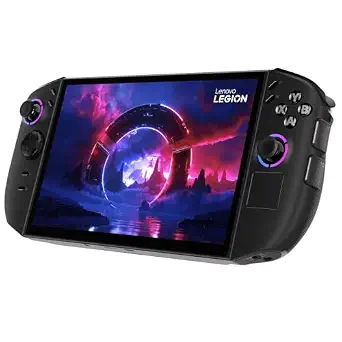
Lenovo Legion Go 2 Gaming Handheld Gaming PC
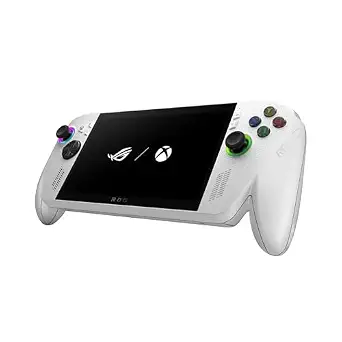
ASUS ROG Xbox Ally
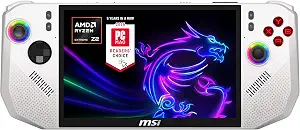
msi Claw A8 PC Gaming Handheld
Best Handheld Pc Buying Guide — Black Friday Deals 2026
A Black Friday search for a handheld PC can make a bold offer seem more important than the configuration behind it. Start instead with the details that could rule a device in or out for your routine: screen format, operating system, memory, storage, processor, and any connection or other feature you know you want. The Lenovo Legion Go 2, ASUS ROG Xbox Ally, and MSI Claw A8 present different combinations of those details. This guide compares what is listed, not unverified sale claims or predicted performance. Before deciding, confirm that the Black Friday listing is for the exact model and configuration you intend to buy.
Lenovo Legion Go 2 Gaming Handheld Gaming PC
Best Overall is the editorial label for the Lenovo Legion Go 2 because its listed configuration brings together a Ryzen Z2 8C processor, 32GB RAM, 1TB NVMe SSD, an 8.8 WUXGA OLED 144Hz display, a 74Whr battery, Wi-Fi 6E, and Windows 11 Home. That breadth may suit a shopper who would rather start with a rounded feature set than center the decision on one particular connection or processor listing. The label is a way to organize this guide, not a claim of measured superiority. When a Black Friday offer catches your eye, check that these are the specifications attached to the actual listing.
The screen description is especially useful if display type and refresh rate are prominent in your personal checklist: the listed panel is OLED and 144Hz, with WUXGA resolution and an 8.8-inch size. Those terms describe the offered screen, but they do not establish how a particular game will look or run. Memory and storage also have distinct roles in the comparison. The 32GB RAM and 1TB NVMe SSD are the stated capacities and drive type; consider whether those amounts match your own expectations for the games and files you plan to keep on the device, rather than assuming a particular result.
The 74Whr battery and Wi-Fi 6E are additional listed details to weigh according to where and how you expect to use a handheld. They may matter to someone comparing power capacity or wireless specification, but the listing alone does not tell you how long a charge lasts in a particular situation or what network experience you will get. Windows 11 Home is another confirmation point if the operating system matters to your choice. On Black Friday, this model makes most sense to shortlist when its full combination—not just its screen or headline processor—matches your priorities. If one of those details is not important to you, compare its value in the offer against a configuration that better fits your actual must-haves.
Key specs
| Processor | AMD Ryzen Z2 8C |
| Memory | 32GB RAM |
| Storage | 1TB NVMe SSD |
| Display | 8.8 WUXGA OLED 144Hz |
| Battery | 74Whr battery |
| Wireless | Wi-Fi 6E |
| Operating system | Windows 11 Home |
ASUS ROG Xbox Ally
Best for dual USB-C connectivity is the editorial label for the ASUS ROG Xbox Ally, based specifically on its listed dual USB Type-C ports. That makes it a natural candidate for shoppers who want to give this connection detail explicit weight in a shortlist. The label does not imply that the ports provide any unlisted function, or that the device is better overall. Its other confirmed details are an AMD Ryzen Z2 A processor, 16GB of LPDDR5 6400MHz RAM, a 512GB SSD, Windows 11, and a 7” 1080p 120Hz touchscreen. Check the Black Friday listing to make sure its configuration matches these facts.
Think about the screen in terms of your own preferences. The listing specifies a touchscreen with 1080p resolution and a 120Hz refresh rate, as well as a 7” size. These descriptions help distinguish the configuration on paper; they do not promise a particular experience with a game or application. The smaller listed screen size than the other devices here may appeal to someone who prefers that description, while someone with a different screen priority may favor another configuration. That is a personal fit question, not a conclusion about image quality or portability.
The stated memory and storage are 16GB of LPDDR5 6400MHz RAM and a 512GB SSD. Use those capacities to ask whether the configuration suits the amount of content and headroom you want, without treating them as a forecast of performance or storage needs for every buyer. Windows 11 is the operating system listed, so confirm that this is the version you want. During Black Friday browsing, it is easy to focus on a deal label or one appealing feature; compare the port count alongside the screen, memory, storage, and operating system instead. This ASUS may be a strong shortlist fit when dual USB Type-C ports are a deliberate requirement and its remaining listed details also work for you.
Key specs
| Display | 7” 1080p 120Hz Touchscreen |
| Processor | AMD Ryzen Z2 A |
| Memory | 16GB of LPDDR5 6400MHz RAM |
| Storage | 512GB SSD |
| Operating system | Windows 11 |
| Connectivity | dual USB Type-C ports |
msi Claw A8 PC Gaming Handheld
Check Price on Amazon
Best for processor-focused comparison is the editorial label for the MSI Claw A8. The reason is narrow and transparent: its listing identifies an AMD Ryzen Z2 Extreme processor, giving processor-conscious shoppers a clear point to examine. The label does not claim that it outperforms the other devices or establish how it behaves in games. The rest of the listed configuration matters just as much to a purchase decision: an 8” FHD+ 120Hz display, 24GB LPDDR5x memory, a 1TB NVMe SSD, an SD Card Reader, and Win 11 Home. Check each detail against the Black Friday offer rather than relying on the processor name alone.
If your shortlist begins with the processor, use that as an opening filter, then return to your screen preferences and memory and storage priorities. The MSI display is described as 8” FHD+ with a 120Hz refresh rate. Those are the supplied screen specifications; they do not establish performance or a subjective viewing result. Its 24GB LPDDR5x memory and 1TB NVMe SSD give you concrete capacity and drive-type details to compare with your own expectations. Avoid reading those numbers as a promise that a particular workload will be suitable; your intended games and use habits are part of the decision.
The SD Card Reader is another listed feature worth noting if card-reader availability is on your checklist. No further function or compatibility detail is provided here, so verify the exact listing if you need a particular use from it. Win 11 Home is the operating system shown. On Black Friday, this model can be an especially relevant comparison point for shoppers drawn to its processor designation, provided they also find the screen, memory, storage, and operating system acceptable. If another listed feature is more central to your routine, give it equal attention rather than letting the processor label settle the choice.
Key specs
| Processor | AMD Ryzen Z2 Extreme |
| Display | 8" FHD+ 120Hz Display |
| Memory | 24GB LPDDR5x |
| Storage | 1TB NVMe SSD |
| Card reader | SD Card Reader |
| Operating system | Win 11 Home |
Start by ruling out a poor fit
Before opening a Black Friday comparison, write down the deal-breakers that matter in ordinary use. An operating system may be a firm requirement; screen size or touchscreen status may shape how you interact with the device; a particular listed connection may be essential to your setup. That short list helps you eliminate configurations that do not fit, instead of being pulled toward whichever listing has the most attention-grabbing headline. In this group, the Lenovo and MSI list Windows 11 Home, while the ASUS lists Windows 11. Preserve those exact descriptions in your notes and confirm the operating system on the offer page.
Next, separate must-haves from preferences. You might want a certain screen description but remain flexible about processor; another shopper might put a confirmed port detail first and be open to other differences. Do not treat a missing fact in this guide as proof that a product lacks a feature. It simply means you should check the exact listing if that feature matters. Black Friday pages can place the configuration name beside promotional language, so make the model identity and listed details your first checks. A deal is relevant only if the particular device offered meets the conditions you set before browsing.
Picture the screen in your usual setting
The screen specifications are easier to compare when you connect them to your preferences rather than treating resolution or refresh rate as a score. The Lenovo lists an 8.8 WUXGA OLED 144Hz display; the ASUS lists a 7” 1080p 120Hz touchscreen; the MSI lists an 8” FHD+ 120Hz display. The ASUS is the only one of these records that explicitly says touchscreen. If touch input is important, that distinction gives you a concrete point to verify. If it is not, focus on the screen size and terminology that best fit your own priorities.
These labels do not settle questions about brightness, color, viewing angles, or game performance, none of which are specified here. Nor should you assume that a higher refresh-rate figure guarantees a particular result in every game. Instead, note exactly what the listing says and decide which characteristics you care about most. During Black Friday, this approach can keep a persuasive screen headline from distracting you from the complete configuration. When possible, compare the same specification wording on the product offer and your shortlist, and investigate any detail you cannot confirm before choosing.
Give capacity a purpose in your shortlist
Memory and storage are separate questions, so avoid collapsing them into one judgment. The Lenovo lists 32GB RAM and a 1TB NVMe SSD. The ASUS lists 16GB of LPDDR5 6400MHz RAM and a 512GB SSD. The MSI lists 24GB LPDDR5x and a 1TB NVMe SSD. These are useful configuration facts, but they do not reveal how much space your personal library will require or how a game will perform. Think about the amount of content you expect to keep available and whether the stated storage capacity aligns with that plan.
Memory type and capacity are also worth recording as given, without assuming that one listing translates into a measured advantage for your use. A Black Friday comparison is clearer when you set a minimum that feels appropriate to you, then check the exact offer against it. If you do not know what capacity you need, avoid letting the largest number decide automatically; consider your habits and seek confirmation for the applications or games you have in mind. The useful outcome is a shortlist that reflects your requirements, not an unsupported promise about future performance.
Use processor and extras as deliberate filters
Processor names can attract attention, but they are only one part of these configurations. The Lenovo lists AMD Ryzen Z2 8C, the ASUS lists AMD Ryzen Z2 A, and the MSI lists AMD Ryzen Z2 Extreme. These names let you compare the stated processors, but they do not establish a performance ranking. If processor choice is central to your decision, look for reliable information relevant to your intended games and settings rather than inferring results from the names alone. Also check that the model in that information is the same configuration being offered.
Then consider the other confirmed details that may make a device more convenient for you. The ASUS lists dual USB Type-C ports; the MSI lists an SD Card Reader; the Lenovo lists Wi-Fi 6E and a 74Whr battery. These facts are not interchangeable, and their importance depends on your own setup. The records do not establish extra functions, runtime, or compatibility, so verify any specific use you have in mind. During Black Friday, make a feature earn its place on your shortlist by connecting it to a real need rather than treating every listed extra as equally valuable.
Check the offer against the device you chose
A Black Friday promotion is worth evaluating only after you know what product and configuration it covers. Match the model name and the specifications on the page to the version you intended to compare. Check processor, memory, storage, display, operating system, and any connection or extra that influenced your choice. If a listing leaves an important detail unclear, do not fill the gap with an assumption; seek clarification or compare an offer whose configuration is clear. This is particularly important when a product name is presented alongside multiple configurations or when a page’s headline does not repeat every specification.
Compare the complete offer on its own terms, including the exact item and any conditions stated on the listing. This guide has no sale prices, discount amounts, stock information, or seller-policy details, so it cannot tell you whether a particular promotion is worthwhile. Keep your notes beside the offer and judge whether the configuration fits your priorities before considering the promotional framing. If the deal is not for the version you researched, it is not a like-for-like comparison. A careful check can prevent a Black Friday headline from deciding for you.
Make your Black Friday choice
The best handheld PC for your Black Friday shortlist is the one whose confirmed configuration fits the way you want to use it, not simply the one with the most appealing headline. Consider the Lenovo for its broad listed feature set, the ASUS if dual USB Type-C ports matter to you, or the MSI if its processor designation is a useful starting point for your comparison. Those are guide labels, not measured verdicts. Verify the exact model and specifications on the offer, weigh the details against your own must-haves, and leave any unconfirmed claim out of the decision.